
Search Results (Searched for: UIKIT)

Please look in the Downloads for Plugin 4.0.15:
www.joomlaplates.com/login.html?folder=uikit%252Fplugin
The Problem with menu thrid level is a bug in Astroid 3.3.13. You must wait for the new Version Astroid 3.4.0. than it is fixed.
You can test ist with the beta Version:
github.com/templaza/astroid-framework/releases/tag/v3.4.0-rc5
The full version is comming soon.
The Problem with menu thrid level is a bug in Astroid 3.3.13. You must wait for the new Version Astroid 3.4.0. than it is fixed.
You can test ist with the beta Version:
github.com/templaza/astroid-framework/releases/tag/v3.4.0-rc5
The full version is comming soon.
Hi, we have been using Joomlatemplate B2B for a while and works well, I need to update the "UIkit 3 Framework Plugin", but I could not find it in the download file site, other 27 plugins and asteroid template files were correctly updated and re-installed.
After update to Joomla 5.4.4 the main menu has some issues in the 3d level item (links to article are blind)
After update to Joomla 5.4.4 the main menu has some issues in the 3d level item (links to article are blind)
Replied by WM-Loose on topic [SOLVED] UIkit 3 Grid Portfolio übergibt eingetragene Schlagwörter nicht
19 Mar 2026 15:05 - 20 Mar 2026 09:19
Nach Reihenfolge der von Ihnen angelegten Elemente (Karten) im Modul.
Replied by Studiosilvershadow on topic [SOLVED] UIkit 3 Grid Portfolio übergibt eingetragene Schlagwörter nicht
19 Mar 2026 14:54
Hallo liebes Team,
habt Ihr noch einen Tip, da es die Modul-ID nicht gibt, nach welchen Kriterien sortiert das Modul jetzt die Einträge?
Danke im Voraus
H. Werner
habt Ihr noch einen Tip, da es die Modul-ID nicht gibt, nach welchen Kriterien sortiert das Modul jetzt die Einträge?
Danke im Voraus
H. Werner
Replied by Studiosilvershadow on topic [SOLVED] UIkit 3 Grid Portfolio übergibt eingetragene Schlagwörter nicht
19 Mar 2026 14:47
Habe es gerade nochmals installiert, jetzt werden alle Schlagwörter wieder angezeigt.
Danke für Eure Unterstützung.
Beste Grüße
H. Werner
Danke für Eure Unterstützung.
Beste Grüße
H. Werner
Replied by Studiosilvershadow on topic [SOLVED] UIkit 3 Grid Portfolio übergibt eingetragene Schlagwörter nicht
19 Mar 2026 14:40
Replied by WM-Loose on topic [SOLVED] UIkit 3 Grid Portfolio übergibt eingetragene Schlagwörter nicht
19 Mar 2026 14:11
So, die Versionen sind aktuell.
Bitte geben Sie uns den Link zur betroffenen Webseite an, damit wir und das auch ansehen können.
Bitte geben Sie uns den Link zur betroffenen Webseite an, damit wir und das auch ansehen können.
Replied by WM-Loose on topic [SOLVED] UIkit 3 Grid Portfolio übergibt eingetragene Schlagwörter nicht
19 Mar 2026 14:06
Grid Portfolio 2.5 gerade von der JP DE Seite heruntergeladen und getestet. Die Tags werden alle angezeigt.
Eventuell ein Bug im Modul der JP Com Seite.
Muss erst geprüft werden.
Bitte gedulden Sie sich.
Eventuell ein Bug im Modul der JP Com Seite.
Muss erst geprüft werden.
Bitte gedulden Sie sich.
Replied by Studiosilvershadow on topic [SOLVED] UIkit 3 Grid Portfolio übergibt eingetragene Schlagwörter nicht
19 Mar 2026 12:14 - 19 Mar 2026 12:15
Danke liebes Team;
für die prompte Reaktion.
Chache wurde geleert. Die neuste Version, V2.5 ist installiert.
Ich habe mal einige Screenshots hinzugefügt. Das Modul gibt lediglich den Tag „Alle“ aus.
Im Quelltext wird auch nur „Alles“ als übergeben angezeigt.
Mit besten Grüßen
H. Werner
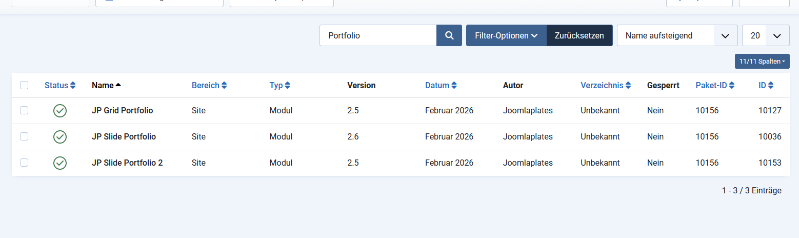
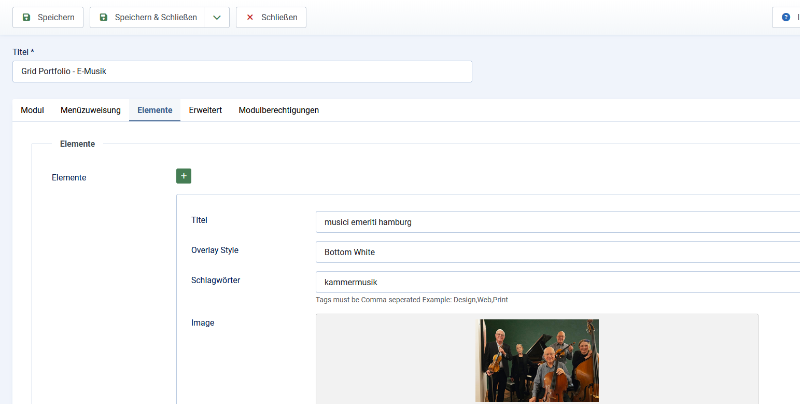
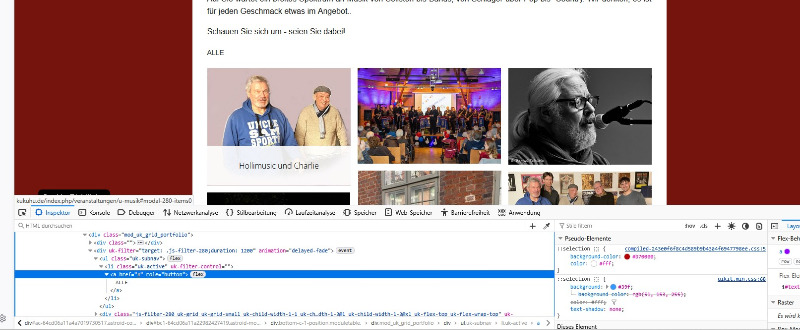
für die prompte Reaktion.
Chache wurde geleert. Die neuste Version, V2.5 ist installiert.
Ich habe mal einige Screenshots hinzugefügt. Das Modul gibt lediglich den Tag „Alle“ aus.
Im Quelltext wird auch nur „Alles“ als übergeben angezeigt.
Mit besten Grüßen
H. Werner
Replied by WM-Loose on topic [SOLVED] UIkit 3 Grid Portfolio übergibt eingetragene Schlagwörter nicht
19 Mar 2026 10:58 - 19 Mar 2026 11:03
Wurde denn auch die aktuelle, letzte Version des Moduls 2.5 heruntergeladen und installiert?
Die neuen Module benotigen keine extra ID mehr. Bitte öffnen sie mal das Module und schliessen sie es dann.
Ggf mal den Cache löschen oder deativieren
Die neuen Module benotigen keine extra ID mehr. Bitte öffnen sie mal das Module und schliessen sie es dann.
Ggf mal den Cache löschen oder deativieren
[SOLVED] UIkit 3 Grid Portfolio übergibt eingetragene Schlagwörter nicht was created by Studiosilvershadow
19 Mar 2026 10:23
Hallo liebe Joomlaplates-Team,nach dem letzten Update des Moduls UIkit 3 Grid Portfolio ist mir ein Problem aufgefallen, das ich so vorher nicht hatte:Die Schlagwörter (Tags) werden aktuell nicht mehr übernommen bzw. angezeigt. Dadurch funktioniert die Filterung der Portfolio-Elemente nicht mehr korrekt.Zusätzlich ist mir aufgefallen, dass das Eingabefeld für die Modul-ID fehlt, welches ich bisher genutzt habe, um die Elemente entsprechend zu sortieren bzw. gezielt anzusprechen.Hat noch jemand dieses Problem oder gibt es bereits eine Lösung bzw. einen Workaround dafür?Vielen Dank im Voraus für eure Hilfe!Beste Grüße
H. Werner
H. Werner

Hello,
Thank you for your message and for sharing the details from your hosting provider.
To be very clear: none of our uikit modules or the Astroid framework has any security vulnerability. We maintain strict security standards, perform regular audits, and release updates precisely to prevent issues like this.
In the future, your hosting provider should refrain from making such claims without clear forensic evidence. Blaming a third-party extension without proper investigation is misleading and unprofessional.Important point:
If a hacker already had admin access to your Joomla installation, this almost always means the core Joomla CMS itself (or the server) was compromised first — not through any third-party extension like Astroid. Once an attacker has admin rights via Joomla’s core, they can edit or replace any file on the site, including Astroid template files.
That is exactly why it looks like “an Astroid file was affected” — the attacker simply used admin rights to modify it after the initial breach.You mentioned you already have the latest Astroid update installed, which confirms there was no unpatched vulnerability on our side.If you can share the full statement from your provider (the part after “The hack occurred on…”), the exact logs, or any other technical details, we will be happy to review them together and help you clarify this with your host.We are here to support you 100 % and want to get your site secure again as quickly as possible.
Best regards, Joomlaplates
Thank you for your message and for sharing the details from your hosting provider.
To be very clear: none of our uikit modules or the Astroid framework has any security vulnerability. We maintain strict security standards, perform regular audits, and release updates precisely to prevent issues like this.
If your hosting provider claims that an Astroid file caused the hack, they must provide concrete proof (for example, a specific exploit path, log evidence, or CVE reference showing how the vulnerability was used). General statements without evidence are not acceptable and are often just assumptions.
In the future, your hosting provider should refrain from making such claims without clear forensic evidence. Blaming a third-party extension without proper investigation is misleading and unprofessional.Important point:
If a hacker already had admin access to your Joomla installation, this almost always means the core Joomla CMS itself (or the server) was compromised first — not through any third-party extension like Astroid. Once an attacker has admin rights via Joomla’s core, they can edit or replace any file on the site, including Astroid template files.
That is exactly why it looks like “an Astroid file was affected” — the attacker simply used admin rights to modify it after the initial breach.You mentioned you already have the latest Astroid update installed, which confirms there was no unpatched vulnerability on our side.If you can share the full statement from your provider (the part after “The hack occurred on…”), the exact logs, or any other technical details, we will be happy to review them together and help you clarify this with your host.We are here to support you 100 % and want to get your site secure again as quickly as possible.
Best regards, Joomlaplates
[SOLVED] Sélection des couleurs et icone modification non présent was created by Manipil
13 Feb 2026 03:25
Templates : tp_master 2.6
Uikit : 4.0.13
Joomla 5 to 6.02
Astroid 3.3.8
Quick start installation master
Je ne peut pas régler les couleurs ni éditer le layout
Avez vous une solution
Merci
Uikit : 4.0.13
Joomla 5 to 6.02
Astroid 3.3.8
Quick start installation master
Je ne peut pas régler les couleurs ni éditer le layout
Avez vous une solution
Merci
Replied by joomlaplates on topic [SOLVED] Update Modul JP Simple Grid von 2.1 auf 2.2
10 Feb 2026 20:27
Sorry, nun verfugbar
www.joomlaplates.com/login.html?folder=uikit%252Fplugin
www.joomlaplates.com/login.html?folder=uikit%252Fplugin
Danke super hat geklappt. Nun geht’s weiter.
UIkit Framework Plugin Premium 4.0.13 ist auch nicht im Download verfügbar oder ich bin blind.
UIkit Framework Plugin Premium 4.0.13 ist auch nicht im Download verfügbar oder ich bin blind.
Displaying 16 - 30 out of 46 results.