
[SOLVED] TP Easy: How can I get the menu position to put menu to other position?
- jac.puts@hccnet.nl
- Offline Topic Author
- Fresh Boarder
-

- Posts: 2
- Thank you received: 0
Hello,
I am one step further.
I installed the astroid plugin, and now I can see the positions, but I don't see the menu position.
How can I get the menu position to put my menu to that position?
Can I get some support.
Thanks,
Jac
I am one step further.
I installed the astroid plugin, and now I can see the positions, but I don't see the menu position.
How can I get the menu position to put my menu to that position?
Can I get some support.
Thanks,
Jac
Last Edit:10 months 4 days ago
by jac.puts@hccnet.nl
Last edit: 10 months 4 days ago by jac.puts@hccnet.nl. Reason: I am a step further
The topic has been locked.

Replied by WM-Loose on topic [SOLVED] TP Easy: How can I get the menu position to put menu to other position?
Posted 10 months 3 days ago #36187
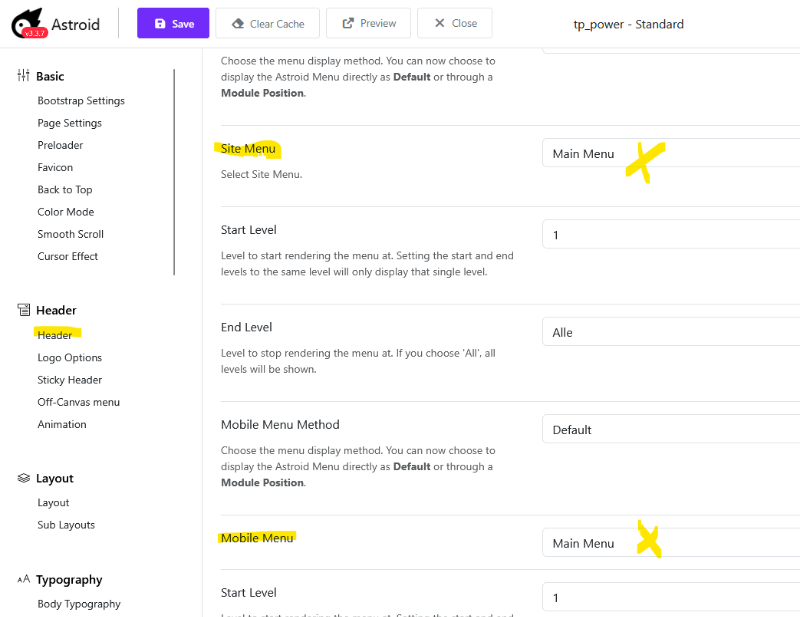
The menu is specified in the template options. Look under "Header" and then select the menu that should be displayed for your website and mobile devices.
Last Edit:8 months 3 weeks ago
by WM-Loose
Last edit: 8 months 3 weeks ago by WM-Loose.
The topic has been locked.