
Joomlaplates News Channel, Updates und Changelogs.
Important info regarding the urgently needed removal of the Asteroid 2.5.1 Pack


Important info regarding the urgently needed removal of the Asteroid 2.5.1 Pack was created by WM-Loose
Posted 9 months 2 weeks ago #36222
According to various customer feedback, it may be possible that an old Astroid 2.5.1 package installation is still in your extensions. In individual cases, the old version from 2020 was not uninstalled by an update to the Astroid version. This version 2.5.1 causes an error when deactivating the backwards compatibility plugin in the backend, which can only be fixed by reactivating the backwards compatibility plugin in your database. To avoid this in advance, we ask you to proceed as follows:
Important: The Astroid Preset Switcher (if present) must be uninstalled before removing Astroid 2.5.1, otherwise your backend will no longer function!
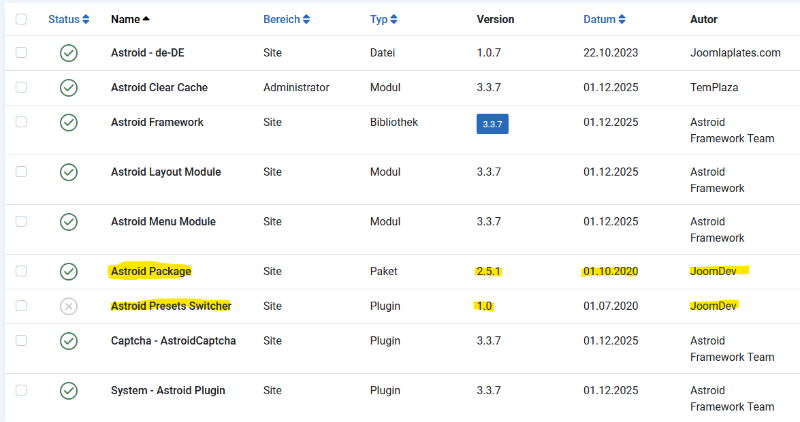
In the backend go to System/Extensions Search for Astroid If you see version 2.5.1, uninstall the package. Also search for Astroid Presets Switcher Uninstall Astroid Preset Switcher After uninstallation, the front end of your website will no longer be displayed and you will no longer be able to open the template options, but this can be quickly remedied:
Download the latest version of Astroid and reinstall it in the backend (just install it over it). Now all of your settings should be available again in the template options and the front end of your website should work.
Thank you for your understanding.
Important: The Astroid Preset Switcher (if present) must be uninstalled before removing Astroid 2.5.1, otherwise your backend will no longer function!
In the backend go to System/Extensions Search for Astroid If you see version 2.5.1, uninstall the package. Also search for Astroid Presets Switcher Uninstall Astroid Preset Switcher After uninstallation, the front end of your website will no longer be displayed and you will no longer be able to open the template options, but this can be quickly remedied:
Download the latest version of Astroid and reinstall it in the backend (just install it over it). Now all of your settings should be available again in the template options and the front end of your website should work.
Thank you for your understanding.
Last Edit:8 months 3 weeks ago
by WM-Loose
Last edit: 8 months 3 weeks ago by WM-Loose.
Please Log in or Create an account to join the conversation.