
[SOLVED] UI 3 Gallery: How to get rid of the white mouse over block


UI 3 Gallery: How to get rid of the white mouse over block was created by bkoppe
Posted 1 year 9 months ago #35433
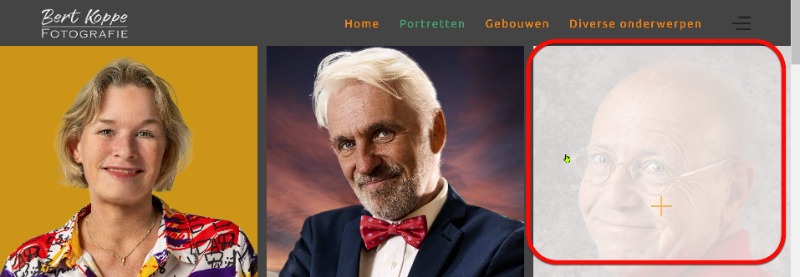
The gallery is great but I want to get rid of the white mouse over block, or with less opacity.
How can I fix that?
I'm using the jp-Travel template.
Thanks for helping me out
Bert
How can I fix that?
I'm using the jp-Travel template.
Thanks for helping me out
Bert
by bkoppe
The topic has been locked.


Replied by WM-Loose on topic UI 3 Gallery: How to get rid of the white mouse over block
Posted 1 year 9 months ago #35434
Write this in your custom.css into the template-options:
.uk-overlay-default {
background: none;
}
.uk-overlay-default {
background: none;
}
by WM-Loose
The topic has been locked.
Replied by bkoppe on topic [SOLVED] UI 3 Gallery: How to get rid of the white mouse over block
Posted 1 year 9 months ago #35437
Hallo Dirk,
Es hat geklappt.
Vielmals Dank.
MfG,
Bert
Es hat geklappt.
Vielmals Dank.
MfG,
Bert
Last Edit:1 year 9 months ago
by bkoppe
Last edit: 1 year 9 months ago by WM-Loose.
The topic has been locked.