
[SOLVED] language switcher in the header mobile version

language switcher in the header mobile version was created by jemartin
Posted 10 months 2 weeks ago #36154
Hi,
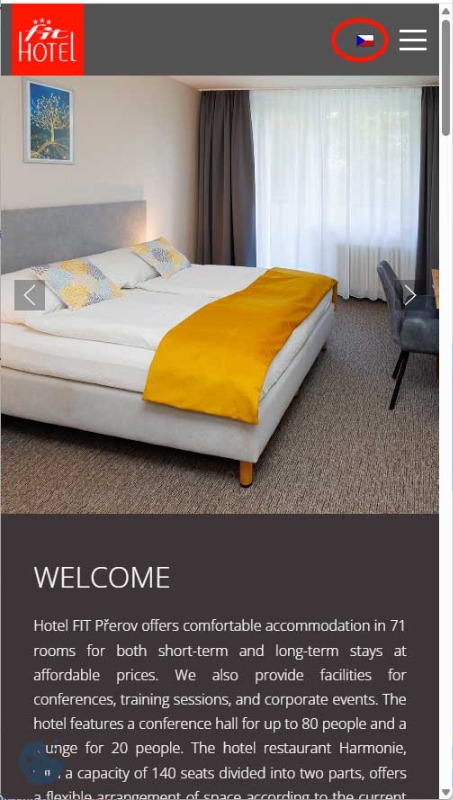
I would like to ask for advice, is it possible to somehow set the position of the "language switcher" module directly in the header in the mobile version of the website, to the left of the hamburger icon (off-canvas menu)? It should look like the image in the attachment.
Thank you.
I would like to ask for advice, is it possible to somehow set the position of the "language switcher" module directly in the header in the mobile version of the website, to the left of the hamburger icon (off-canvas menu)? It should look like the image in the attachment.
Thank you.
by jemartin
The topic has been locked.
- Administrator
- Offline
- Moderator
-

- Posts: 773
- Thank you received: 125
Replied by Administrator on topic [SOLVED] language switcher in the header mobile version
Posted 10 months 20 hours ago #36180
Hi!
Try this:
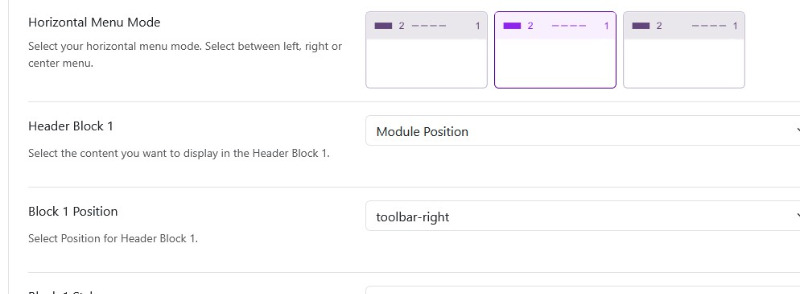
Set the language-modul to position toolbar-right:

Set this in the astroid-framework:'
And now this to your Custom CSS Field in the astroid-framework:
It works on my local installation:

Try this:
Set the language-modul to position toolbar-right:
Set this in the astroid-framework:'
And now this to your Custom CSS Field in the astroid-framework:
Code:
@media (min-width: 300px) {
.d-md-block {
display: block !important;
}
}
It works on my local installation:
Supporter bei forum.joomla.de
Last Edit:9 months 3 weeks ago
by Administrator
Last edit: 9 months 3 weeks ago by WM-Loose.
The topic has been locked.