
[SOLVED] "JP Gallery (Directory)" in a Joomla 6 installation gives an error
- estaamonestado
- Offline Topic Author
- Fresh Boarder
-

- Posts: 17
- Thank you received: 1
Replied by estaamonestado on topic "JP Gallery (Directory)" in a Joomla 6 installation gives an error
Posted 8 months 1 week ago #36261
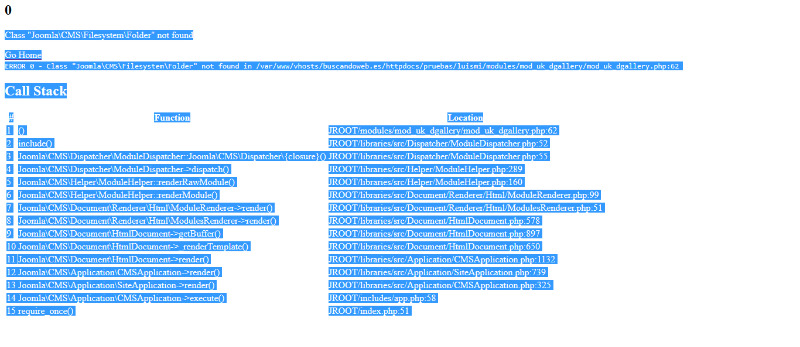
adunto el texto que aparece y captura de pantlla:
..................................Class "Joomla\CMS\Filesystem\Folder" not found Go Home
Call Stack#FunctionLocation1()JROOT/modules/mod_uk_dgallery/mod_uk_dgallery.php:622include()JROOT/libraries/src/Dispatcher/ModuleDispatcher.php:523Joomla\CMS\Dispatcher\ModuleDispatcher::Joomla\CMS\Dispatcher\{closure}()JROOT/libraries/src/Dispatcher/ModuleDispatcher.php:554Joomla\CMS\Dispatcher\ModuleDispatcher->dispatch()JROOT/libraries/src/Helper/ModuleHelper.php:2895Joomla\CMS\Helper\ModuleHelper::renderRawModule()JROOT/libraries/src/Helper/ModuleHelper.php:1606Joomla\CMS\Helper\ModuleHelper::renderModule()JROOT/libraries/src/Document/Renderer/Html/ModuleRenderer.php:997Joomla\CMS\Document\Renderer\Html\ModuleRenderer->render()JROOT/libraries/src/Document/Renderer/Html/ModulesRenderer.php:518Joomla\CMS\Document\Renderer\Html\ModulesRenderer->render()JROOT/libraries/src/Document/HtmlDocument.php:5789Joomla\CMS\Document\HtmlDocument->getBuffer()JROOT/libraries/src/Document/HtmlDocument.php:89710Joomla\CMS\Document\HtmlDocument->_renderTemplate()JROOT/libraries/src/Document/HtmlDocument.php:65011Joomla\CMS\Document\HtmlDocument->render()JROOT/libraries/src/Application/CMSApplication.php:113212Joomla\CMS\Application\CMSApplication->render()JROOT/libraries/src/Application/SiteApplication.php:73913Joomla\CMS\Application\SiteApplication->render()JROOT/libraries/src/Application/CMSApplication.php:32514Joomla\CMS\Application\CMSApplication->execute()JROOT/includes/app.php:5815require_once()JROOT/index.php:51
..................................Class "Joomla\CMS\Filesystem\Folder" not found Go Home
Code:
ERROR 0 - Class "Joomla\CMS\Filesystem\Folder" not found in /var/www/vhosts/buscandoweb.es/httpdocs/pruebas/luismi/modules/mod_uk_dgallery/mod_uk_dgallery.php:62
Last Edit:8 months 1 week ago
by estaamonestado
Last edit: 8 months 1 week ago by estaamonestado.
The topic has been locked.
- Administrator
- Offline
- Moderator
-

- Posts: 773
- Thank you received: 125
Replied by Administrator on topic "JP Gallery (Directory)" in a Joomla 6 installation gives an error
Posted 8 months 1 week ago #36262
Did you aktivate the behaviour backward compatibility 6-Plugin?
Supporter bei forum.joomla.de
Last Edit:8 months 1 week ago
by Administrator
Last edit: 8 months 1 week ago by Administrator.
The following user(s) said Thank You: estaamonestado
The topic has been locked.
- estaamonestado
- Offline Topic Author
- Fresh Boarder
-
- Posts: 17
- Thank you received: 1
Replied by estaamonestado on topic "JP Gallery (Directory)" in a Joomla 6 installation gives an error
Posted 8 months 1 week ago #36263
I just activated the plugin and it's working now, thank you so much for your help, everything is working correctly now, you're very kind.
The topic has been locked.

Replied by WM-Loose on topic "JP Gallery (Directory)" in a Joomla 6 installation gives an error
Posted 8 months 1 week ago #36264
It should also work when the compatibility plugin is deactivated. We haven't had any problems with this in any of our installations, so it seems to be only happening to you. However, you should find the root cause of the error permanently, because the plugin will eventually be removed in a future Joomla version, and you'll inevitably encounter the problem again then.
by WM-Loose
The following user(s) said Thank You: estaamonestado
The topic has been locked.
- estaamonestado
- Offline Topic Author
- Fresh Boarder
-
- Posts: 17
- Thank you received: 1
Replied by estaamonestado on topic [SOLVED] "JP Gallery (Directory)" in a Joomla 6 installation gives an error
Posted 8 months 1 week ago #36267
I saw that you just released an update for that module today, January 30th, and I updated it and it works correctly without the compatibility plugin. Thank you so much for your help and speed; everything is working perfectly.
Last Edit:8 months 1 week ago
by estaamonestado
Last edit: 8 months 1 week ago by WM-Loose.
The following user(s) said Thank You: WM-Loose
The topic has been locked.